
ID scanning in licensed premises
Licensees in safe night precincts (SNPs) who have approval to trade past midnight on a permanent basis must operate networked identification (ID) scanners at each entry point to their premises (unless they're exempt from requiring ID scanners).
If your licensed premises is exempt from installing and operating networked ID scanners, you can still choose to opt in to the scheme.
A networked ID scanner's purpose is to cross-check a person's details against a database of banned patrons. It's not meant to be used as a primary ID verification method. While ID scanners may be able to validate some ID as genuine, you should always verify a person's ID before using the ID scanner. The ID scanner's main function is to check the patron's ID against the banned list.
In this guide you'll learn about your ID scanning obligations, including:
- which liquor licensees are exempt
- whose ID you need to scan and when
- who is allowed to scan ID
- forms of ID you can accept
- your privacy obligations, including managing personal information and dealing with privacy complaints
- managing banning orders and positive scans
- what to do if the ID scanner malfunctions
- setting up your networked ID scanner with an approved operator
- managing re-entry passes.
Licensees and staff who must operate ID scanners
Your premises must operate a networked identification (ID) scanner if:
- it is in a safe night precinct (SNP) and you're approved to trade past midnight on a permanent basis
- your liquor licence is not exempt from ID scanning
- a condition on your licence requires you to operate a networked ID scanner.
If you meet these conditions, the Office of Liquor and Gaming Regulation (OLGR) will consider your premises to be a 'regulated premises for ID scanning'.
Exempt licensees
The following licensees are exempt from having to operate networked ID scanners (unless they're required to by a specific condition of their licence):
- licensees who don't permanently trade past midnight in an SNP, including SNP licensees who have temporary late night trading permits
- community club licensees
- subsidiary on-premises (meals) licensees, for example, restaurants
- commercial special facility licensees like casinos or convention centres
- accommodation operators with subsidiary on-premises licences, for example, motels.
You can also apply to OLGR to have your premises, or part of it, exempted from ID scanning.
Read Liquor Guideline 59—declaration of licensed premises (or part of) as 'not regulated for ID scanning' to find out more.
Staff who can operate an ID scanner
Generally, only crowd controllers licensed under the Security Providers Act 1993 can operate networked ID scanners. However, there's an exception to this requirement.
You don't need to be a licensed crowd controller to operate a networked ID scanner if all of these conditions are met:
- you're appropriately trained to operate the networked ID scanner
- you're indirectly supervised by a licensed crowd controller at all times—you can't be left alone to operate the scanner; a licensed crowd controller needs to be near enough to be able to instruct you
- you don't remove banned patrons—only a licensed crowd controller can remove banned patrons from (or around) the regulated premises
- you don't get involved in any physical interaction between a licensed crowd controller and a patron.
Read the guideline about the security licence exemption for ID scanning.
Opting in to networked ID scanning
You can voluntarily opt in to use networked ID scanning even if you're not required to.
To opt in, apply to OLGR for a licence condition declaring your premises to be a 'regulated premises for ID scanning'.
If you're approved, you'll need to meet the regulatory obligations for ID scanning.
Also consider...
- Find out more about when you must scan ID.
- Read about approved operators.
- Find out what to do if an ID scanner fails or malfunctions.
- Download and display the Scan in for a safe night out LCD screen graphic on your screens.
- Print and display the Scan in for a safe night out poster.
Requirements for ID scanning
Staff of regulated premises for identification (ID) scanning must each scan patron's ID from 10pm on the days you're authorised to sell liquor after midnight.
Before scanning ID, you should first verify it is genuine. Learn about checking hard copy ID and checking digital ID for all patrons.
You must scan ID from 10pm on the day before a public holiday even if you stop selling alcohol before midnight or 1am—for example, if Wednesday is a public holiday, and you're authorised to sell liquor past midnight on Tuesday, you must scan ID from 10pm on Tuesday.
You don't need to scan ID on Mondays, Tuesdays, Wednesdays or Thursdays if you're not open for business after 1am the next day (unless the next day is a public holiday). However, you can't decide to sell alcohol after 1am if you haven't already scanned each patron's ID from 10pm.
You can use re-entry passes so you only have to scan each patron's ID once from 10pm onwards.
Where to put your ID scanners
You must operate a networked ID scanner at each entry to your regulated premises. Approved operators can provide advice about the placement of your ID scanners, if required.
What staff who can scan ID need to know
Staff who can scan ID must know:
- what to do if they scan a banned patron's ID
- what to do if they experience an ID scanner system failure
- the types of ID they can accept
- the requirements for refusing entry
- any re-entry pass requirements
- their privacy obligations, including details of your venue's personal information collection notice, how to access your privacy policy and how to deal with a privacy complaint.
You should contact the approved operator for training and advice about operating the networked ID scanner.
Penalties for not scanning ID
You could be fined if you don't comply with your ID scanning entry requirements. Both the staff member controlling entry to the premises (including contractors) and the licensee can be fined. The maximum penalty is $1,669 if you fail to comply.
It's also an offence to try to ban an authorised investigator from entering your licensed premises unless you ban the investigator for their behaviour as a patron.
The maximum penalty for inappropriately banning an investigator from the premises is $33,380 or 1 year imprisonment.
ID you don't have to scan
You don't have to scan ID for:
- employees, including contractors and entertainers (unless they're entering the premises as patrons)
- people attending functions not open to the public—for example, a 21st birthday or a wedding
- people who are eating meals in a part of the premises ordinarily set aside for dining (even if alcohol is served—or they're drinking—with the meal), in premises with
- a commercial hotel licence
- a subsidiary on-premises licence with accommodation as the main business activity
- temporary or permanent residents, for example, hotel guests
- exempt minors.
Also consider...
- Find out the forms of ID you can accept.
Acceptable forms of ID for scanning
While ID scanners may be able to validate some ID as genuine, you should always verify a person's ID before using the ID scanner. The ID scanner's main function is to check the patron's ID against the banned list.
The following types of identification (ID) are acceptable for networked ID scanners:
- a photo ID card
- an Australian driver licence or learner permit, including the
- a foreign driver licence
- a passport from any country.
ID documents must be current and include a photo of the person and their date of birth.
Digital ID
Make sure you verify a person's digital ID is genuine before using the ID scanner. The ID scanner is mainly used for checking the patron's ID against the banned list.
Check the information on each website to find out how to verify the different forms of digital ID. Learn how to check a:
- Queensland digital ID
- Australia Post Keypass identity card—note: Australia Post will discontinue the use of this ID on 1 February 2026
- South Australian digital driver licence
- New South Wales Digital Driver Licence
- Victorian Digital Driver Licence.
Refer to the support material provided with your ID scanner or contact your approved operator to find out which digital ID is supported.
If a digital ID scan fails, the scanner will alert you. You will need to scrutinise the ID further.
Do not manually enter the person's details into the ID scanner as it may be a sign the ID is not genuine.
If you have any doubt about the authenticity of an ID, you should always refuse entry to your venue.
If a minor is found on your premises with fake ID, you may be at risk of not meeting the due diligence requirements of your licence. Licensees and staff can be fined up to $16,690 if a non-exempt minor is found on the licensed premises.
Foreign driver licences that aren't in English
Where a foreign driver licence isn't in English, the person should also present an international driver permit issued in their country of origin. This ID must be in English and include a photo of the licence holder.
Expired Queensland driver licences and renewal receipts
A Queenslander who has renewed their driver licence but is still waiting for it to arrive can show a Department of Transport and Main Roads driver licence renewal receipt with their expired licence for ID scanning.
You don't have to accept the receipt if you don't want the person to enter—this is at your discretion.
Also consider...
- Read more about checking hard copy ID and checking digital ID for all patrons.
Re-entry passes for licensed premises
Licensees who use networked identification (ID) scanners can also use re-entry passes. Re-entry passes allow patrons to leave and re-enter the premises during the same trading period without having their ID re-scanned.
Patrons can't re-enter a regulated premises after 10pm without first:
- having their ID verified as genuine and also scanned for cross-checking against the banned list
- or
- showing a suitable re-entry pass.
For example, if they exit temporarily to have a cigarette, when they re-enter after 10pm, they'll need to have their ID checked and scanned again or show a re-entry pass.
You can give each patron their re-entry passes the first time you scan their ID as long as they don't have banning orders for your premises.
Read more about when you must scan ID.
Suitable types of re-entry passes
A re-entry pass can be an identifying mark (e.g. a stamp), an object (e.g. a wristband) or a type of electronic identifier.
If you want to use an object or electronic identifier, contact us to discuss the suitability of your proposed re-entry system.
Re-entry stamps must be identifiable as re-entry passes and meet the following requirements.
-
The re-entry stamp design should include the name of your premises and the trading date.
The stamp can show the trading day (e.g. Friday, Saturday) instead of a date as long as you don't accept a stamp from the week before—using water soluble ink will help.
The stamp you give each patron whose ID you've scanned must be different to any stamps you give patrons before 10pm whose ID you haven't scanned. Consider using different coloured ink and adding different wording.
We will monitor the use of stamps and will consider them insufficient if we identify any issues. We won't accept a stamp that:
- hasn't been designed specifically for your premises, for example, a stamp produced in bulk and available for the public to buy
- only includes your premises' name.
-
To make sure the re-entry stamp is secure, ensure the ink can't be transferred between people without it being obvious to your staff—using fast-drying, water-soluble ink will help. Your staff should check if it looks faded.
Don't choose a stamp design where the image and premises' name are simple and easily copied or drawn. Symmetrical designs are easier to transfer from one patron to another.
The stamp should be applied to the same spot on everyone (e.g. inside the left wrist) to help avoid it being transferred or copied.
-
Only issue re-entry passes to patrons who've had their ID scanned during regulated hours (i.e. from 10pm to closing).
It's not acceptable practice to issue a stamp on exit after 10pm without first confirming the person had their ID scanned earlier. If you're not sure, scan their ID again before issuing the re-entry stamp.
Keep a written record of your re-entry pass system
You must keep a written record of the type of re-entry pass system you're using and make it available for inspection by the Office of Liquor and Gaming Regulation (OLGR) when requested.
Consider recording the following points about the daily operation of your re-entry pass system:
- how you ensure your re-entry pass is unique
- the person who decides the type of re-entry pass you use
- which date you include on your re-entry pass (i.e. the date the trading period starts or the date it ends)
- the staff who are responsible for issuing re-entry passes and checking them when patrons re-enter the premises
- when and how staff are trained in the re-entry pass system
- how patrons re-entering the premises are managed (e.g. in separate queues or at alternate entry points)
- your venue's policy for managing invalid re-entry passes or suspicions of dishonesty (e.g. scanning the patron's ID again)
- the security controls you use to prevent re-entry passes being copied or transferred by patrons.
Best practice example
The Place 2B (TP2B) is a licensed premises that operates a re-entry pass system on:
- Friday, Saturday and Sunday nights
- the eve of public holidays
- other nights during regulated hours, as determined by management.
TP2B has a single entry to the premises. A queueing area is separated by a rope running parallel to, and 1.5m from, the wall. This allows pedestrians to pass on the footpath. A separate queue is set up for re-entry.
TP2B uses a stamp as the re-entry pass. It's a self-inking stamp, using fast-drying, water-soluble red ink. It shows the premises' logo and states 're-entry pass' and the trading date.
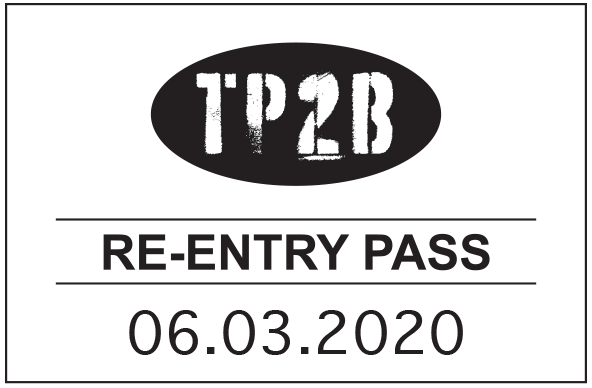
When the re-entry system is operating TP2B ensures:
- the date on the stamp is the date the trading period starts
- re-entry stamps are only issued when the ID has been verified as genuine and scanned after 10pm
- patrons are stamped right after their ID has been verified and scanned, once it's confirmed they don't have banning orders for the premises and aren't being denied entry for another reason
- re-entry stamps are applied to patrons' inside right wrists
- no one leaving the premises is stamped without first having their ID verified and scanned
- only staff members who've been properly trained apply the re-entry stamp and check its authenticity
- they re-scan each patron's ID if there's any doubt about the validity of the stamp
- all stamps are secured by management in the office safe when not in use
- prominent signage lets patrons know stamps don't provide automatic right of entry—they may be required to re-scan their ID on re-entry at the discretion of management or the crowd controller.
Training
At induction, all staff, including crowd controllers, should be trained in your re-entry system and their roles in its operation.
Refusing entry to banned patrons
Licensees, crowd controllers and staff should understand the different patron bans and how to handle situations when banned patrons try to enter your premises.
Refusing entry to people with court or police bans
You must refuse entry to a patron who is identified by your networked identification (ID) scanning system or facial recognition technology as having a court or police ban for your premises.
You must also remove banned patrons from your premises if you become aware that they're banned after they've entered.
As the licensee, you can decide whether to allow a person to enter your premises if they have a court or police ban for another premises.
For example, if John Smith is banned by police from entering or remaining in all licensed premises in Mackay and:
- your regulated premises is in Mackay, you must stop John Smith entering your premises
- your regulated premises is in Townsville, you don't have to refuse John Smith entry as he is only banned from licensed premises in Mackay.
Reporting a court or police-banned patron
The networked ID scanning system will automatically send an email to the Queensland Police Service (QPS) when a banned patron tries to gain entry to your premises.
The QPS asks licensees to also notify them immediately through:
- Policelink on 131 444
- any linked radio with real-time QPS monitoring in a safe night precinct (SNP).
To assist the QPS, your staff or crowd controllers should note the person's description and direction of travel if they leave.
By law, you can't detain a banned person or confiscate their ID.
If you're using a manual ban list (because the ID scanner has failed for some reason), you should notify the QPS of the:
- date and time of the detection
- personID (this is located on the manual ban list)
- nicheID (this is located on the manual ban list)
- premises' name.
Registering licensee or venue bans
If you ban someone from entering your licensed premises, you'll need to register the ban on the networked ID scanning system.
To register a licensee ban, enter these details:
- the patron's name
- their date of birth
- the timeframe of the ban
- the reason for the ban
- their photo.
Your approved operator can give you more information about how to do this.
Managing the entry of people with licensee or venue bans
You can decide whether you're willing to admit someone who's subject to a licensee-issued ban—there's no obligation under the Liquor Act 1992 to stop them from entering.
For example, if John Smith has a licensee ban for a premises in Townsville, each licensee in Townsville (including the licensee who issued the ban) can decide whether to let John Smith into their licensed premises.
Other reasons to refuse entry
You must refuse entry to your premises after 10pm (when scanning is required, unless certain exemptions apply) if:
- the patron fails to produce valid photo ID
- a licensed crowd controller (or staff member supervised by a licensed crowd controller) of the regulated premises doesn't scan the photo ID using a networked ID scanner
- in the case of an ID scanner system failure, a licensed crowd controller of the regulated premises (or staff member supervised by a licensed crowd controller) doesn't check the photo ID against the manual ban list.
Also consider...
- Read more about security staff for licensed premises.
- Download and display the Scan in for a safe night out LCD screen graphic on your venue screens.
- Print and display the Scan in for a safe night out poster.
- Learn more about your privacy requirements when using facial recognition technology.
- Read the Commissioner's guideline on the use of facial recognition technology.
Approved operators of ID scanners
Licensees of regulated premises (or licensees opting in to the networked identification (ID) scanning scheme) need to enter into a contract with one of these 'approved operators' to get their ID scanning equipment:
These operators are approved by the Office of Liquor and Gaming Regulation (OLGR) to provide regulated premises with networked ID scanners.
(The licensee or staff member who scans a person's ID isn't the approved operator.)
You don't need approval from OLGR for the networked ID scanner. The approved operator is responsible for having OLGR approve your equipment.
Responsibilities of approved operators
Approved operators of ID scanners are responsible for:
- providing regulated premises with networked ID scanning equipment
- transmitting banning order data to regulated premises to enforce banning orders
- giving regulated premises a current manual list of banned patrons to refer to in a system failure
- providing 24-hour phone support to regulated premises and escalating issues to appropriately qualified technicians if the system fails or malfunctions.
Approved operators are also responsible for maintaining and operating the systems holding data about banned patrons, including:
- ensuring personal information isn't held in the networked ID scanning system for more than 30 days (except for banning order data)
- removing licensee bans from the system 30 days after a licence transfers to another operator, unless otherwise requested by the new licensee
- handling ID scanning system errors and malfunctions, if directed by OLGR (the Commissioner for Liquor and Gaming Regulation can notify affected licensees of this directive to resolve an issue).
Approved operators must comply with all privacy-related regulations as set out in the Privacy Act 1988 (Cwlth) and the Liquor Act 1992.
How to become an approved operator
Eligible companies can apply to become approved operators for ID scanners.
The Commissioner for Liquor and Gaming Regulation will decide if applicants are suitable, and a probity process will apply.
Also consider...
- Read more about managing ID scanning system outages and failures.
- Download and display the Scan in for a safe night out LCD screen graphic on your screens.
- Print and display the Scan in for a safe night out poster.
Failure or malfunction of a networked ID scanner
If your networked identification (ID) scanner malfunctions or breaks down, you still cannot allow a patron to enter the premises unless their ID has been checked and you have confirmed they're not banned from entering the premises.
If the system fails, or there's an incident involving the ID scanner, take these actions.
-
You must check each patron's photo ID against a current physical list of banned patrons (i.e. the 'manual ban list') before allowing them entry after 10pm. The approved operator must give you the manual ban list.
We strongly recommend you ask your approved operator for the manual ban list before a malfunction happens. Each manual ban list is current for 7 days.
Take note of your privacy obligations in handling and storing the personal information contained in the manual ban list.
Read about what to do if you identify a banned patron.
-
Immediately notify your approved operator of a system failure or malfunction in writing so they can arrange a technician to fix it.
If an incident occurs that impacts the security or performance of your ID scanning system—even if it doesn't result in a system failure—you must notify the approved operator as soon as possible. For example, you must notify the approved operator if:
- a drink is spilt on the ID scanner
- the ID scanner is dropped
- you've experienced physical interference or suspected unauthorised access to the scanner or system.
-
You need to notify the Office of Liquor and Gaming Regulation (OLGR) if you can't scan a patron's ID during regulated hours and you've used a manual ban list to allow patrons entry to your premises.
To notify OLGR, log in to the OLGR Client Portal and complete the System failure—Licensee form.
You must notify OLGR within 48 hours from the first time you allowed a patron entry during the system failure.
OLGR will share your notification with the Queensland Police Service (QPS), so you won't need to also notify the QPS.
If your networked ID scanning system fails outside regulated hours, or you don't let patrons enter during the failure, you don't need to report this to OLGR as the failure won't have affected your requirement to scan each patron's ID.
-
If you've identified a banned patron using the manual list, you should notify the Queensland Police Service of the:
- date and time of the detection
- personID (this is located on the manual ban list)
- nicheID (this is located on the manual ban list)
- premises' name.
Repair and maintenance of networked ID scanners
Repair and maintenance of networked ID scanners and ID scanning systems must be coordinated by an approved operator.
Approved operators must provide 24-hour phone support for regulated premises. This includes escalating issues to appropriately qualified technicians in the event of system failures or malfunctions.
Also consider...
- Download and display the Scan in for a safe night out LCD screen graphic on your screens.
- Print and display the Scan in for a safe night out poster.
- Read the Liquor Act 1992 and Security Providers Act 1993.
Privacy and ID scanning
The Privacy Act 1988 (Cwlth) requires liquor licensees to protect personal information recorded by networked identification (ID) scanners or facial recognition technology (FRT).
If your regulated premises has a turnover of more than $3 million in a financial year, you must comply with the Privacy Act.
Read Guideline 64—Privacy obligations for establishing and operating identification scanning systems for more information.
How to opt in to the Privacy Act
If your regulated premises has an annual turnover of $3 million or less, the Office of the Australian Information Commissioner (OAIC) allows you to opt in to be covered by the Privacy Act.
You'll need a privacy policy for your business to opt in. When you're ready, complete the online opt-in application form.
Your business trading name and ABN will be placed on the public opt-in register.
Complying with Australian Privacy Principles (APPs)
As a licensee of a regulated premises for networked ID scanning, you must comply with the Australian Privacy Principles (APPs) as set out in the Privacy Act. APPs cover the collection, use, disclosure and storage of personal information.
You must take steps to protect any personal information you hold from misuse, interference, loss, unauthorised access, modification and disclosure.
The OAIC's Privacy Management Framework can help you implement practices, procedures and systems that ensure compliance with the APPs. Always refer to the OAIC's APPs and the Privacy Act to fully comply with your privacy requirements.
Privacy policy
You must develop a privacy policy and make it publicly available. Use this example privacy policy to help draft your own.
The OAIC's Guide to developing an APP privacy policy also provides useful tips for drafting your privacy management policy.
Privacy management plan
You must have an internal procedure or a privacy management plan, which explains how your venue handles privacy.
It must include information about how you:
- protect personal information from misuse, interference, loss, unauthorised access, modification or disclosure
- handle privacy complaints.
You can customise this example privacy management plan for your premises.
Important APPs
The APPs summarised below are particularly relevant to regulated premises using ID scanners, but licensees need to comply with all APPs.
-
You must manage personal information in an open and transparent way.
You must detail how you do this in your privacy policy.
-
Before scanning a patron's ID, you must notify them that your networked ID scanning system collects personal information.
You can do this by displaying an information collection notice at each public entrance to your premises.
You can base yours off this example information collection notice.
-
You must take reasonable steps to ensure the personal information you collect is accurate, up to date and complete.
-
Patrons have the right to access their personal information held by an approved operator. Some exceptions apply, such as if access might interfere with criminal matters or other breaches of the law.
-
Patrons can request their personal information be corrected. They need to provide satisfactory proof or explanation as to why the information needs to be corrected.
Using personal information for marketing and other reasons
You must only use personal information for the main reason it's collected, which is for identifying banned patrons.
In other limited circumstances, you can use or disclose personal information about a patron for direct marketing.
You must notify patrons of any intention to use their personal information for reasons other than identifying banned patrons. You must also let them know how they can request not to receive direct marketing communications. You can do this by displaying notices at all entries to the premises.
Read sections 7.2 and 7.3 of the APPs for more information about the use and disclosure of personal information for direct marketing.
Accepting value-added services
Approved operators may offer value-added services (i.e. extra features in addition to their standard product or service) to improve the capability of their networked ID scanners.
Before you sign up for value-added services, consider your obligations under the Privacy Act and whether the service complies with the APPs, particularly in relation to the use of personal information for other purposes.
Managing access to personal information
Access to scanned data (including personal information) must be restricted to a limited number of people, such as venue management.
Access is auditable—the networked ID scanning system retains a record of everyone who logs in.
The networked ID scanning system automatically deletes scanned personal information after 30 days.
Some best-practice measures you can take to manage access include:
- not having a group password
- training staff in their privacy obligations
- keeping the networked ID scanning equipment secure by locking offices and ensuring the equipment is constantly supervised.
You must give the Queensland Police Service and Office of Liquor and Gaming Regulation (OLGR) access to patrons' personal information from your ID scanner, when requested.
OLGR also accesses scanned data for statistical purposes and to evaluate the success of the ID scanner scheme. This data is generally de-identified (i.e. it doesn't include personal information).
Staff training resources
Use these information notes and the presentation about ID scanning privacy obligations to teach your staff about their privacy obligations when scanning patrons' ID. They're based on the APPs and are designed to be adapted for individual premises.
Privacy complaints
You must tell patrons how they can make a privacy complaint.
You must include this information in your information collection notice and display it at or near all public entrances to your premises.
You must also include your privacy complaint process in your privacy policy.
How patrons can make privacy complaints
Complaints must be in writing. They must be lodged directly with your premises or the approved operator.
How licensees must deal with privacy complaints
You must:
- accept and review any written privacy complaints
- notify OLGR that you've received a written privacy complaint within 14 days of receiving it—you can do this by logging in to the OLGR client portal and selecting the privacy complaint form
- respond to the complainant within 30 days—if they're not happy with the outcome, give them details about how to lodge a complaint with the OAIC.
If a patron isn't happy with the outcome
If you don't respond within 30 days or the person isn't satisfied with your response, they can lodge a complaint directly with OAIC.
The OAIC investigates privacy complaints from individuals about private-sector organisations covered by the Privacy Act.
The OAIC accepts privacy complaints in writing through their online privacy complaint form, which can be submitted by post or email.
Also consider...
- Download and display the Scan in for a safe night out LCD screen graphic on your screens.
- Print and display the Scan in for a safe night out poster.
- Find out about your privacy obligations when using facial recognition technology.
- Read the Liquor Act 1992.
ID scanning checklist
This checklist will help you meet your obligations when using networked ID scanners. You and your staff can do regular self-assessment to ensure you're complying with ID scanner requirements.
Note: This checklist is meant as a guide only and doesn't include everything you need to know or do. Read more about networked ID scanning.
General obligations
Operation and maintenance
Privacy
© The State of Queensland 1995–2026